Showing posts with label Zend Framework 2. Show all posts
Tuesday, 6 November 2012

Zend Framework 2 : Use Composer & Packagist PHP

Introduction

Composer is a tool for depedency management in PHP. It allows you to declare the dependent libraries in your project needs and it will install them in your project.

Composer is not a package manager but composer manages them (packages or libary) on a per-project basis, installing them in a directory (e.g vendor) inside your project. By default it will never install anything globally. thus , it's a dependency manager.

The problem that composer can solve are :

a) You have a project that depends on a number of libraries.
b) Some of those libraries depend on other libraries.
c) You declare the things you depend on.
d) Composer finds out which versions of which packages need to be installed, and installs them (meaning it download them into your project like apt-get command in ubuntu).

Installation

First, you have to install curl on your pc by type command on your terminal :
 sudo apt-get install curl 
Then type command to get executetable composer.phar
 $ curl -s https://getcomposer.org/installer | php
This will just check a few PHP settings and then download composer.phar to your working directory. This file is the Composer binary. It is a PHAR (PHP archive), which is an archive format for PHP which can be run on the command line, amongst other things.
Wednesday, 31 October 2012

Zend Framework 2 : Send Html Mail with Simple Template

Here is my experiment with some help from my friend, how to use zend framework 2 mail component to sent mail as html. Even though we don't have any mail server or we just don't want to think of how to set mail server but with this component we could send mail easily. In this section, we will utilize a reliable smtp server like Gmail. Then we just have to have an account on the web mail to use the service for send mail.

Before we move on to the code, make sure that openssl have activated on our php.ini configuration. By doing uncomment extension=php_openssl.dll.

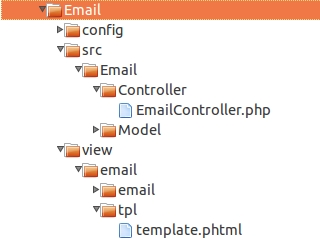
Let's assume that we have a module called Email with structure as below


1. Make a template for mail

In view/email directory, there's a tpl directory contains template.phtml. template.phtml file is used for our template content mail that will be sent. Actually, you can make template mail wherever you want.

template.phtml


Greetings

ini template buat email !!
2. Call Namespace Zend Component
// for email library
use Zend\Mail;
use Zend\Mime\Part as MimePart;
use Zend\Mime\Message as MimeMessage;
3. Make action on your Controller to send mail
// setup SMTP options
$options = new Mail\Transport\SmtpOptions(array(
            'name' => 'localhost',
            'host' => 'smtp.gmail.com',
            'port'=> 587,
            'connection_class' => 'login',
            'connection_config' => array(
                'username' => 'put your gmail username ',
                'password' => 'put your gmail password',
                'ssl'=> 'tls',
            ),
));
                 
$this->renderer = $this->getServiceLocator()->get('ViewRenderer');
$content = $this->renderer->render('email/tpl/template', null);

// make a header as html
$html = new MimePart($content);
$html->type = "text/html";
$body = new MimeMessage();
$body->setParts(array($html,));

// instance mail 
$mail = new Mail\Message();
$mail->setBody($body); // will generate our code html from template.phtml
$mail->setFrom('sender email address','Sender Name');
$mail->setTo('some email addressed');
$mail->setSubject('Your Subject');

$transport = new Mail\Transport\Smtp($options);
$transport->send($mail);

Tuesday, 16 October 2012

Zend Framework 2 : Using Classmap Generator

Since version 5, PHP has given support that very varied in OOP. One of them by overloading feature implemented on PHP 5.1.2. This feature really helps the efficiency of the writing of the code becomes more compact (so we don't need to use require or include  to load a class).

In Zend Framework 2, there is Zend\Loader\Autoloader component for autoloading of Zend Framework and your own classes. It provides functionality through two classes: StandardAutoloader and ClassMapAutoloader. here, I would explain about classmap generator that could generate Classmap Autoloader in Zend Framework .The class map autoloader its self is a high performance autoloader. It uses class maps, which are simply associative arrays of each classname to the name of the file disk that contains that class.

The contents of classmap autoloader usually like this :
   return array(
    'ZendSkeletonModule\Module'                        => __DIR__ . '/Module.php',
    'ZendSkeletonModule\Controller\SkeletonController' => __DIR__ . '/src/ZendSkeletonModule/Controller/SkeletonController.php',
    'ZendSkeletonModuleTest\Framework\TestCase'        => __DIR__ . '/tests/ZendSkeletonModule/Framework/TestCase.php',
    'ZendSkeletonModuleTest\SampleTest'                => __DIR__ . '/tests/ZendSkeletonModule/SampleTest.php',
);
The problem basically if our class in our application are pretty much. We would be getting tired and bored to write it manually. So Zend Framework 2 provides classMap generator that already exist in the vendor\ZF2\bin folder if you download ZendSkeletonApplication.

Assume that we have a structure module directory as below:


Well, the file autoload_classmap is in our module folder. So we just have to execute file ../../vendor/ZendFramework/bin/classmap_generator.php as below :
 server@server-comp:/var/www/ZendSkeletonApplication/module/Test$ php ../../vendor/ZF2/bin/classmap_generator.php -w -l ./ \ -o ./autoload_classmap.php
PHP Warning:  Module 'pdo_pgsql' already loaded in Unknown on line 0
Creating class file map for library in '/var/www/ZendSkeletonApplication/module/Test'...
Wrote classmap file to '/var/www/ZendSkeletonApplication/module/Test/autoload_classmap.php'
server@server-comp:/var/www/ZendSkeletonApplication/module/Test$ 
then if you do it correctly, the file autoload_classmap would change become like this :
 return array(
    'Test\Module'                    => __DIR__ . '/Module.php',
    'Test\Controller\TestController' => __DIR__ . '/src/Test/Controller/TestController.php',
    'Test\Model\ContohModel'         => __DIR__ . '/src/Test/Model/ContohModel.php',
);
Done !

Reference :
  1. http://samsonasik.wordpress.com/2012/03/15/zend-framework-2-classmap-generator/
  2. http://akrabat.com/zend-framework-2/using-zendloaderautoloader/

Thursday, 4 October 2012

Zend Framework 2 : Instalation and Make a Module

On 3 March 2012, Zend has released zend framework version 2.0. In zend framework 2.0, you will feel the different from previous version (Zend Framework version 1). Some of the different are zend framework 2 is more solid coding and  better performance. Btw, if you wanna try it you should use PHP version 5.3.For installing Zend Framework 2, we could clone GIT version of ZendSkeletonApplication as the basic foundation from our application.
Ok here we go.

First, clone the skeleton by using terminal or everything that could clone it :
git clone --recursive git://github.com/zendframework/ZendSkeletonApplication.git
After we clone, there must be a structure directory like this :


Copyright © 2012 Clighter | Powered by Blogger